SFM Compile: A Complete Guide to Source Filmmaker Compilation, Tools, Features and How It Works

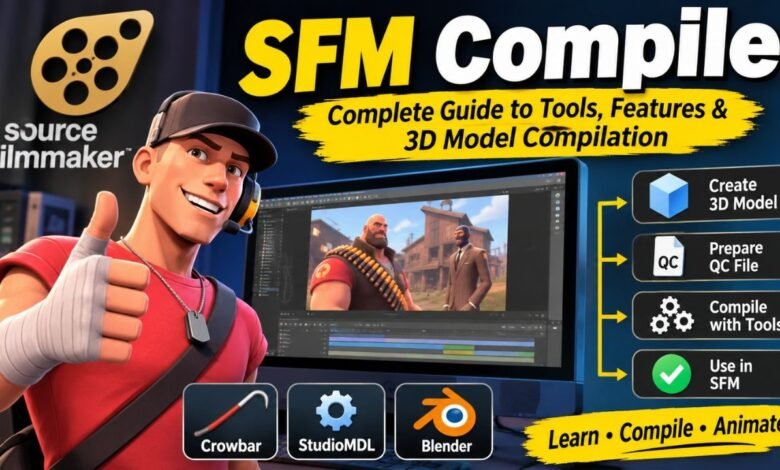
The world of 3D animation and digital filmmaking continues to grow as creators explore new ways to develop characters, build environments, and produce engaging visual stories. One tool that has attracted attention among animation enthusiasts is Source Filmmaker (SFM), a filmmaking application developed by Valve. It allows users to create animated scenes using 3D models, characters, props, lighting, cameras, and other visual elements. In this creative environment, SFM Compile refers to preparing custom models and assets for use in Source Filmmaker.
Whether you’re a beginner learning 3D animation or an experienced creator working with custom characters, understanding SFM Compile can simplify the creative process. It involves preparing model files, organizing textures, configuring compilation instructions, and converting assets into formats supported by the Source engine.
In this guide, we will explore what SFM Compile means, how it works, which tools are involved, its benefits, common problems, and how beginners can get started.
What Is SFM Compile?
SFM Compile generally refers to the process of converting custom 3D models and related assets into formats that can be used by Source Filmmaker. It is closely connected to model preparation and compilation within the Source engine ecosystem.
Source Filmmaker includes various default characters, props, environments, and other resources. However, many creators want to go beyond the available assets and introduce their own characters, objects, and designs. This is where model compilation becomes important.
A typical compilation workflow starts with a 3D model created in software such as Blender or another modeling application. The model is exported into a compatible format, and a configuration file provides instructions for converting it into a Source-compatible model.
The result can then be placed in the appropriate game directory and used inside Source Filmmaker.
It is important to understand that SFM Compile is not the official name of a separate Valve application. Instead, it is a general term associated with the technical process of compiling assets for SFM.
Understanding Source Filmmaker
Source Filmmaker, commonly called SFM, is a 3D animation and filmmaking application developed by Valve. It uses the Source engine and provides a creative environment where users can produce animated scenes using game assets and custom resources.
Unlike traditional video editing applications, Source Filmmaker allows users to work directly with 3D characters and environments. They can position characters, adjust facial expressions, animate movements, control cameras, and create different lighting effects.
Some common uses of Source Filmmaker include:
- Creating short animated films.
- Producing gaming-related videos.
- Developing character animations.
- Creating cinematic scenes.
- Building humorous animated content.
- Producing promotional videos.
- Experimenting with 3D storytelling.
SFM is particularly popular among gaming and animation communities because it gives creators considerable control over their scenes.
Understanding the software itself provides useful background for learning how SFM Compile fits into the larger animation process.
How Does SFM Compile Work?
SFM Compile involves several technical steps that convert an unfinished or externally created model into an asset that the Source engine can recognize.
The process usually begins with a model created in a 3D modeling application. The creator prepares the geometry, skeleton, materials, and animations before exporting the necessary files.
A QC file is then used to provide instructions to the model compiler. These instructions describe important information such as the model’s name, geometry, materials, and animation sequences.
StudioMDL processes these instructions and generates the compiled model files.
The basic process includes:
- Creating or editing a 3D model.
- Preparing its skeleton and materials.
- Exporting the model into SMD or DMX format.
- Creating a QC configuration file.
- Running the model compiler.
- Checking the generated files.
- Installing the completed model in the appropriate directory.
- Opening Source Filmmaker and testing the asset.
Each step matters because an error in the model structure, configuration, or file location can prevent the asset from working correctly.
Main Tools Used for SFM Compile
Several tools can help creators prepare and compile custom models for Source Filmmaker. Each has a different purpose within the workflow.
Crowbar
Crowbar is a popular community-developed utility for working with Source engine models. It provides a graphical interface for compiling and decompiling models.
It can help users run StudioMDL without relying entirely on command-line instructions. This makes the process more approachable for beginners.
Crowbar is commonly used for:
- Compiling custom models.
- Decompiling compatible Source models.
- Managing compilation settings.
- Reviewing compiler output.
- Working with model-related files.
StudioMDL
StudioMDL is the model compiler associated with the Source engine. It processes QC files and the source model data referenced in them.
Its main responsibility is converting prepared model information into compiled files that the engine can use.
Blender
Blender is a widely used 3D modeling and animation application. Creators can use it to build characters, props, environments, and other assets.
It can also help with rigging, mesh editing, and preparing models before exporting them for a Source-compatible workflow.
VTFEdit
VTFEdit is a community texture utility associated with the Valve Texture Format. It can help users convert image files into VTF textures and manage texture-related resources.
Correct texture preparation is important because a model may compile successfully but still appear incorrectly if its materials are missing or improperly configured.
Important File Formats Used in SFM Compile
Understanding the different file formats is an essential part of learning SFM Compile.
Here are some commonly encountered formats:
SMD: StudioMdl Data files can contain model geometry, skeleton information, and animation data.
DMX: A format used by Source tools for storing model and animation information.
QC: A configuration file containing instructions for compiling a model.
MDL: The primary compiled model file used by the Source engine.
VVD: A supporting file containing vertex data.
VTX: A supporting file containing optimized mesh information.
VTF: Valve Texture Format, used for storing textures.
VMT: Valve Material Type, which describes material properties and texture references.
These formats work together to make custom models usable within the Source engine environment. Their exact requirements can depend on the model, compiler version, and game branch.
How to Compile a Model Using SFM Tools
For beginners, the model compilation process may initially appear complicated. However, understanding the individual stages makes it easier to manage.
Step 1: Create Your 3D Model
Start by creating a character, object, or prop in Blender or another suitable 3D modeling application.
Pay attention to the model’s geometry, proportions, and overall structure. If the model needs animation, it should also have an appropriate skeleton and rig.
Step 2: Prepare the Model Files
Before exporting, make sure the model is properly organized. Check its mesh structure, bone assignments, and materials.
Export the required model information into a format supported by the tools you intend to use, such as SMD or DMX.
Step 3: Create a QC File
The QC file provides instructions for compiling the model. It usually includes information about the model name, source geometry, material directory, and animation sequences.
A properly configured QC file is essential for successful compilation.
Step 4: Open Crowbar
Launch Crowbar and configure the appropriate compiler settings. Select the QC file and confirm that the necessary source files and output directories are available.
Step 5: Start Compilation
Run the compilation process using Crowbar or StudioMDL.
The compiler reads the QC instructions and processes the model files. If something is incorrect, the compiler may display errors that help identify the problem.
Step 6: Check the Output
After compilation, inspect the generated files. Confirm that the required model files are present and that the supporting resources are correctly organized.
Step 7: Test the Model in SFM
Place the completed asset in the appropriate Source Filmmaker game directory. Open SFM and check whether the model appears correctly.
Test its textures, animations, and overall appearance before using it in a larger project.
Common SFM Compile Problems and Their Solutions
Even experienced creators can encounter technical difficulties during compilation. Many issues are related to file paths, incorrect configuration, incompatible assets, or missing resources.
Here are some common problems and possible solutions.
Missing Textures
A model may appear with missing or incorrect textures when its VTF files are unavailable or the material references are incorrect.
Solution: Check the texture directory and confirm that the VMT files point to the correct texture locations.
Compilation Errors
Compilation may fail because of incorrect QC instructions, unsupported commands, or problems with source model files.
Solution: Review the compiler log and check the QC file for incorrect paths, formatting problems, or incompatible settings.
Model Not Appearing in SFM
Sometimes a model compiles successfully but does not appear in Source Filmmaker.
Solution: Check the installation directory, model path, and folder structure. Confirm that the application can access the compiled asset.
Broken Skeleton
A model may display incorrect movements when its skeleton or bone assignments are not configured properly.
Solution: Review the rig, bone hierarchy, and vertex weights before exporting the model again.
Missing Animations
Animation problems may occur when the necessary animation sequences are not included or correctly configured.
Solution: Check the exported animation files and the corresponding sequence instructions in the QC file.
Understanding these issues can save time and make the compilation process more reliable.
Benefits of Using SFM Compile
SFM Compile offers several advantages for people who want to create customized animation projects.
Custom Models
One of its biggest advantages is the ability to prepare custom characters and objects. Creators are not limited to the default models available in Source Filmmaker.
Greater Creative Freedom
Custom assets allow users to develop original visual ideas. They can create unique characters, props, and environments that match their storytelling goals.
Better Animation Projects
Properly prepared models can be used in different animation scenes. This gives creators more flexibility when developing cinematic content.
Community Collaboration
The Source Filmmaker community shares tutorials, tools, models, and technical knowledge. Learning compilation can help creators participate in collaborative projects and contribute their own resources.
Improved Asset Management
Understanding file formats and compilation directories helps users organize their projects more effectively.
SFM Compile vs. Animation Rendering
One common misunderstanding is the difference between compiling a model and rendering an animation.
Although these processes are connected, they serve different purposes.
Model compilation prepares custom assets for use in the Source engine. It converts source model information into the formats required by the engine.
Animation rendering happens later, after the creator has built and arranged a scene. It produces the final images or video.
For example, if someone creates a custom character in Blender, they may first need to compile that character before using it in SFM. After creating an animated scene with that character, they can render the completed project.
Therefore, compilation prepares the assets, while rendering produces the final visual result.
Is SFM Compile Suitable for Beginners?
Yes, beginners can learn SFM Compile, although some technical knowledge is helpful.
People who are new to 3D modeling should first understand basic concepts such as meshes, materials, textures, and skeletons.
Learning how files are organized within the Source engine is also important. Beginners should start with simple objects or basic character models rather than attempting complicated projects immediately.
Following established tutorials and testing small changes can help users understand the workflow without becoming overwhelmed.
Crowbar can also make certain compilation tasks easier because it provides a graphical interface for working with model compiler settings.
Tips for Getting Better Results With SFM Compile
A few practical habits can improve the experience of compiling models.
- Keep project files organized in clearly named folders.
- Always create backups before modifying important assets.
- Check model geometry before exporting.
- Make sure textures and materials use correct paths.
- Review QC instructions carefully.
- Read compiler logs whenever an error occurs.
- Test newly compiled models before using them in major projects.
- Use compatible tools and versions.
- Learn basic rigging and animation concepts.
- Follow reliable community tutorials.
These practices can reduce common mistakes and make the process easier to repeat.
Is SFM Compile Safe?
The compilation process itself is a normal technical workflow for preparing 3D assets. However, users should be careful when downloading third-party tools, model files, or scripts from unfamiliar websites.
It is better to use established developer repositories and trusted community resources. Downloaded executable files should be checked before installation.
Users should also review the permissions associated with custom models and textures, particularly when using or sharing assets created by other people.
Another important consideration is that the phrase SFM Compile does not refer to one official standalone Valve website or application. Users should distinguish between legitimate Source Filmmaker resources and unrelated websites that use similar terminology.
The Future of SFM Compile and 3D Animation
The wider 3D animation industry continues to evolve as modeling applications, rendering technologies, and creative tools become more accessible.
Although Source Filmmaker is an established application, it remains relevant to creators who enjoy producing game-inspired animations and cinematic scenes.
Custom model preparation and compilation continue to be useful skills for people working with Source engine assets.
Creating original characters, building custom environments, and experimenting with different animation styles gives creators opportunities to develop more distinctive projects.
Learning the fundamentals of SFM Compile can also introduce beginners to broader technical concepts used in 3D modeling, game development, and digital content creation.
Frequently Asked Questions (FAQs)
What is SFM Compile used for?
SFM Compile is generally used to describe the process of preparing and converting custom 3D models and related assets into formats compatible with Source Filmmaker.
Is SFM Compile an official Valve program?
No. SFM Compile is a general term rather than the official name of a separate Valve application. Source Filmmaker is the official filmmaking software developed by Valve.
Which tool is best for compiling SFM models?
StudioMDL is the model compiler, while Crowbar provides a graphical interface that makes compiling and decompiling Source models more convenient.
Can I use Blender models in Source Filmmaker?
Yes. Blender models can be prepared and exported into compatible formats, such as SMD or DMX, before being compiled for the Source engine.
Why does my compiled SFM model have missing textures?
This problem commonly occurs because of incorrect material references, missing texture files, or improperly configured directories. Checking the VMT and VTF files can help resolve it.
Conclusion
SFM Compile is an important concept for people interested in customizing models and creating animations with Source Filmmaker. It describes a process that transforms externally created 3D assets into formats the Source engine can recognize and use.
By learning tools such as Crowbar, StudioMDL, and Blender, creators can prepare models, organize textures, configure QC files, and troubleshoot common compilation problems.
Although the process may seem technical at first, breaking it into manageable steps makes it easier for beginners to understand. Proper file organization, compatible formats, and careful testing are essential for achieving good results.
Learning SFM Compile can give animation enthusiasts greater creative freedom and help them develop more personalized projects. Whether someone wants to create custom characters, experiment with new props, or produce cinematic scenes, understanding model compilation provides a useful foundation for working with Source Filmmaker.
You May Also Read: Val Studio: Creative Powerhouse in Visual Effects and Digital Innovation