A projector built into a phone sounds like a gimmick until the moment you need a bigger screen and do not have one. A crew needs to read the same drawing. A client wants to see a slide deck in a room with no display. A group at a campsite wants to look at a map together. In each case, the extra device is the thing nobody packed.
This guide explains what a built-in projector actually does, which use cases make it worth the money, and where it falls short.
What Does a Built-in Projector Actually Do?
A built-in projector is a small projection module inside the phone, usually a DLP engine with its own lens, focus system, and cooling. The phone is both the source and the projector, so there is no cable to run, no second device to pair, and nothing extra to charge.
The trade-off is brightness and screen size. A phone-sized projector produces far less light than a wall-powered unit, so it works best at moderate distances in shaded or dim spaces. Its advantage is that it is already with you, and that availability is what makes the best use cases possible.
Best Use Cases for a Built-in Projector
The value of a built-in projector depends less on its specs than on the moments when a shared screen suddenly matters. The use cases below follow the same pattern: a small group, a short window to set up, and no screen available. Here is where that combination shows up most often.
Crew Briefings and Plan Reviews
A group gathered around a phone screen is hard to brief, because only the people at the front can read it. Projecting a drawing, checklist, or safety plan onto a nearby wall lets everyone read the same page at once and leaves the presenter’s hands free to point, mark up, or answer questions. Updated drawings can also be projected quickly when plans change mid-shift.
Presentations Without a Meeting Room
You do not always have a room with a screen. A projector phone lets you present a deck from a vehicle, a tent, a client’s spare room, or a workshop. Carrying a laptop and a separate projector is rarely realistic in the field, so the phone replaces two devices with one. It suits quick pitches, site walk-throughs, and informal client updates best. For a large room or a formal presentation with a big audience, a dedicated projector or screen is still the safer choice.
Training, Teaching, and Demos
Instructors and safety coordinators can project slides, demo videos, or step-by-step guides for a small group without booking equipment. Quick setup makes it practical for toolbox talks and short safety refreshers. It also works for hands-on demos, where the instructor can show a procedure on the wall while demonstrating it on the equipment.
Camping, Travel, and Outdoor Evenings
Movies are the obvious use, but groups also share trail maps, review the day’s photos, or plan the next route together on the same wall. In a hotel or rental, a wall display beats squinting at a small screen for video calls or a shared playlist. These evening uses suit a projector phone well, because darkness improves image quality and the audience is small. Some models also add a flashlight mode, which helps with setting up camp before the screen goes up.
Bigger-Screen Viewing With a Backup
Some projector phones also support video output to a monitor or TV. That gives you the projector when none is available and a brighter screen when one is, so you are not stuck if the room is too bright. It is also a practical fallback for long sessions, since switching to a wired display lets you turn off the projector’s extra power draw.
Where a Built-in Projector Falls Short
A projector phone is a convenience tool, not a home theater. Brightness is the main limit: Phone projectors run in the low hundreds of lumens, so direct sunlight can wash them out. Dim or shaded spaces work best. Image quality also drops as you move farther from the wall.
Projection puts extra demand on the device. The projector needs cooling, so expect some warmth and fan noise, and it uses far more power than normal use. The module also adds thickness and weight, and the vents need occasional cleaning.
How Does It Compare to a Pocket Projector?
A standalone pocket projector can offer a larger or brighter image, but it comes with its own battery, cable, and charger, and it needs a source device. For occasional use at home, that can be a better value. For fieldwork, travel, and one-off setups, a second item to pack, charge, and connect is the friction that stops people from using it at all.
Wireless casting can struggle on weak Wi-Fi connections, while some streaming apps restrict external display playback. A built-in projector avoids the need for a separate casting device, although app-level playback restrictions may still apply.
What to Look For Before You Buy
Follow these steps to judge a built-in projector:
- Check resolution and the stated lumen rating, and read the recommended projection distance.
- Confirm automatic focus and keystone correction, since they decide how fast setup feels.
- Look at battery size and the stated projection runtime, not just overall battery capacity.
- Check whether the phone can send video to an external monitor or TV.
- Consider the weight, the vents, and how the manufacturer says to maintain them.
Why Choose a Rugged Projector Phone?
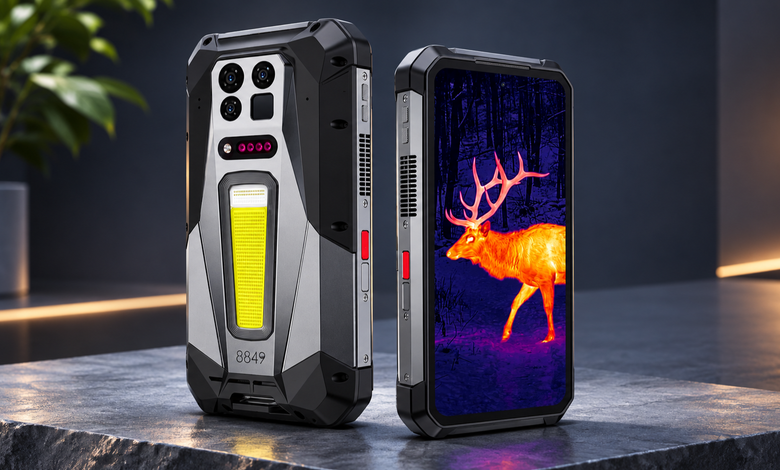
A projector phone is particularly useful in demanding environments such as workshops, campsites, and job sites, where drops, dust, and water are common concerns. The 8849 TANK 5 Pro combines a rugged body with a DLP projector offering 2048 × 1080 resolution, 220 lumens, laser autofocus from 0.5 to 4 meters, and ±45° keystone correction. Its laser module also works as a 4-meter rangefinder for measuring distance, area, and volume.
The 17,600mAh battery supports up to 5 hours of projection, or 6 hours in night mode, according to 8849. It also supports 4K external display output through USB-C DP 1.4 and carries an IP68/IP69K rating. However, its 715g weight makes it relatively heavy, and the cooling vents need regular cleaning to prevent dust or sand buildup.
Is It Worth It? A Quick Verdict
It is worth it if you regularly brief a crew, present in places without a screen, teach small groups, camp or travel often, or want one device instead of a phone plus a pocket projector.
Skip it if you mostly watch video at home on a large TV, need a very bright image in daylight, or would rarely project anything. In that case, the extra weight and cost buy you little.
Conclusion
A built-in projector earns its place when it replaces a separate device you would otherwise have to carry. It is not a replacement for a dedicated home theater, and brightness and distance will always set limits.
Before buying, count how often you would actually project in a month, and check resolution, autofocus, runtime, and weight. If the answer is regularly, a rugged projector phone like the TANK 5 Pro can quietly replace a second device. If the answer is rarely, a standard phone is the more sensible buy.