A phone becomes far more useful abroad when it can open the file in front of you, not just the apps you normally use at home. WPS Office gives Huawei users a straightforward way to handle everyday documents, from a hotel invoice and university form to a client spreadsheet or presentation.
Download first, troubleshoot second
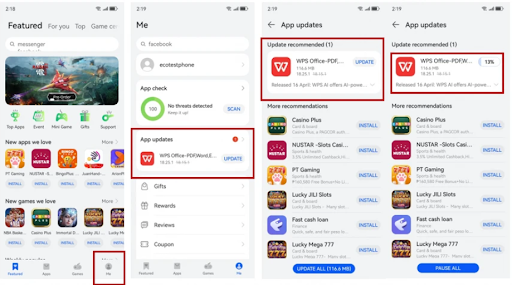
The correct starting point is HUAWEI AppGallery. Search for WPS Office, select the official result, tap Install, and open the app when the process finishes. The installation sequence is outlined in the Huawei Community resource for huawei wps, which keeps the process focused on the phone’s official app channel.
Do not begin with random APK repositories simply because a search result appears quickly. An unofficial package may be old, modified, or difficult to update. If WPS Office is missing, update AppGallery, check the HUAWEI ID region, restart the phone, and search again.
Make local files easy to find
Create a simple folder structure for work, travel, education, and personal records. Move downloaded files out of a crowded Downloads folder and use recognisable names with dates or project references. This makes the huawei wps experience faster when a form or attachment must be found during a meeting.
WPS Office can be used to view and edit common documents, spreadsheet, presentation, and PDF formats. For travel, keep offline copies of essential files, but avoid storing unnecessary identity or financial records for longer than required. A secure screen lock and current device software remain important.
Solve common opening and saving problems
When a document appears blank or incomplete, download it again and confirm the file size. A web portal may save an error page with a familiar filename, which no office app can repair. For a damaged document, ask the sender to export a fresh copy or provide a PDF.
If formatting changes, inspect fonts, tables, page size, formulas, and embedded objects. Save a duplicate before editing an important original. For final distribution, compare the exported PDF with the editable file so that signatures, numbers, and page breaks remain correct.
Work safely across local services
Overseas work often involves local email, delivery platforms, school systems, company portals, and messaging apps. Open attachments only from known senders, check shared-link permissions, and avoid uploading confidential files to an account you do not control. Grant WPS Office only the device permissions needed for the current task.
A stable mobile office setup does not require many tools. It requires one trusted installation, current software, organised storage, and a careful final review. Use the huawei wps page for the initial AppGallery steps, then tailor the workflow to the files and services you use every day.