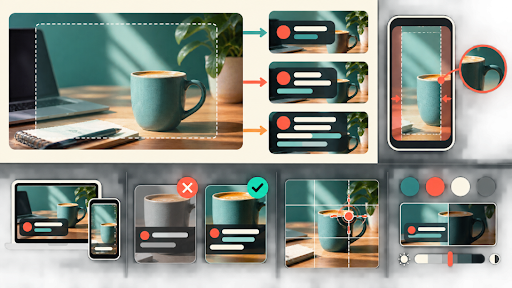
A hero image can provide generous empty space until the real headline arrives. Then a two-line mockup becomes four lines, the category label pushes into the subject, and the mobile title covers the only visual clue. The artwork did not change. The editorial pressure did.
Blog hero approval needs an overlay envelope built from actual title lengths and template rules. The image should support the site’s writing rather than require editors to shorten accurate headlines for a fragile composition.
Measure Three Real Title Zones Step by Step
Capture the article hero, home-page feature, and archive card with their live fonts, widths, line heights, labels, and metadata. These three zones often place type differently even when they share one image. Record the longest recent headline that each zone displayed without manual intervention.
Include category names, bylines, dates, reading time, and buttons that occupy the same region. Do not evaluate an empty frame. The envelope is the combined area required by real editorial content plus the design system’s spacing.
Test the template’s supported alignments and focal controls. If editors can move type left or right, record both. If the theme always centres the crop, do not propose a focal solution the implementation cannot store.
Confirm that the production font has loaded before capturing the zone. A fallback font can wrap the same headline differently and create a false pass. Record font weight and any responsive size change that alters the envelope between staging and the live page.
Include translated or unusually long words if the blog serves several locales. The test does not require every possible headline, but it should cover the language expansion the editorial calendar actually uses. An English-only safe zone can fail immediately on a localised article.
Protect the Subject and the Overlay Envelope
Mark the subject, action evidence, and low-detail type region on the source. The envelope should not cover identity-bearing facial features, product controls, documentary evidence, or the action that explains the story. It should also maintain enough tonal contrast for the site’s approved text treatment.
Create three stress strings: a short headline, a typical headline, and a long but publishable headline. Use real word shapes and punctuation from the site’s archive. Repeated placeholder text does not reveal how capitals, numerals, or long unbroken terms affect line wrapping.
Decide which region may be simplified. Removing a cable or softening harmless texture behind type can be acceptable. Removing a sign, chart label, product port, or person to make space can change what the image proves.
Set a minimum contrast rule for the envelope and test it over the most detailed part of the candidate. Do not assume a translucent gradient fixes every frame. The gradient itself can hide evidence or create an unapproved mood when it becomes too heavy.
Keep the headline, logo, category, and decorative type outside the image master. Generated or baked-in words are harder to update, translate, and make accessible. The clean master should contain only visual material that remains valid when the article wording changes.
Edit the Master Before Adding Any Headline
PicEditor AI’s official site supports JPEG, PNG, and WebP uploads up to 30 MB and provides focused tools for object removal, background cleanup, enhancement, upscaling, restyling, relighting, and background change. Use a clean master without the headline baked into the pixels.
A bounded request might say: “Reduce the small clutter inside the marked right-side type region. Keep the person, hands, notebook, screen, desk edge, wall geometry, lighting direction, subject position, and full canvas unchanged. Add no text, logos, props, or people.”
An AI Photo Editor can create the candidate, but the headline should return through the template, not through generated pixels. Save the source, envelope map, request, clean candidate, and a side-by-side edge review.
PicEditor AI focused pages may show different output, visibility, resolution, and credit controls. Check the current interface before using unpublished art. The overlay workflow should not depend on privacy or export behaviour that the live route does not state.
Save one rejected candidate beside the approved version when it illustrates the envelope failure. A side-by-side example teaches future editors which reconstructed textures or lighting shifts made the headline less readable, without turning the article into a general tool comparison.
Stress the Candidate with Long Headlines
Place the candidate in all three template zones and cycle through the stress strings. Evaluate readability at the intended desktop and mobile sizes. A desktop-safe envelope may disappear when the image centre-crops on a mobile archive card.
Check contrast without adding an unapproved heavy gradient. If the long title requires a darker overlay, verify that the subject and evidence remain visible. The remedy should not turn a documentary image into a decorative silhouette.
Compare the promise made by the cropped image with the headline. If the mobile crop shows only a portrait while the title describes a tool demonstration, the hero no longer supports the article. Choose another source or an approved focal position rather than forcing more text into the empty area.
Check the automatically generated social card and feed thumbnail. Those routes may use a different crop, cache an older file, or omit the overlay entirely. Approve the exact rendered derivative instead of assuming the article hero controls every distribution surface.
Clear or bypass the preview cache during replacement tests. A correct new master can appear to fail when the browser or social crawler still serves the old image. Record the final asset URL so the review points to the file that readers will receive.
Use pass, conditional pass, or reject per zone. Conditional pass may specify alignment, focal coordinate, or approved gradient. Reject means the image cannot support normal editorial pressure. Do not create an undocumented one-off font size to rescue it.
Store Template-Specific Exports with the Master
The handoff includes the clean master, envelope map, three template screenshots, stress strings, approved alignment, focal coordinate, gradient rule, alt text, and theme version. Keep the title in the content system so editors can update language without regenerating art.
Store focal coordinates as data when the content system supports them. A screenshot of the chosen crop is not enough if the site must reproduce it across new cards. When coordinates are unsupported, export named template-specific derivatives and document which component uses each one.
Write alt text from the story-bearing image, not from the overlay layout. It should describe the subject and action that survived the crops without repeating the headline word for word. If the mobile derivative tells a different story, revise the crop rather than the alt text.
Teams using a gpt photo editor for blog artwork should treat PicEditor AI as the cleanup step, not the typography engine. The live template remains the proof that the image can carry real editorial copy.
Retest after a font, spacing, card, or responsive rule changes. Archive failed screenshots with the reason. A resilient hero image gives headlines room to be accurate, lets templates behave consistently, and keeps the story-bearing pixels visible under realistic pressure.
Remove superseded derivatives from the active media picker or label them clearly. Editors working under deadline often select the most familiar thumbnail. A clean archive prevents an older crop from returning after the theme and envelope rules have changed.